
Getting a VR app approved on the Meta Quest store is not complicated — but it is unforgiving about specifics. Miss one asset requirement, skip an entitlement check, or submit with the wrong APK signature scheme, and you are waiting for another review cycle. When we shipped Immersive Exposure — an interactive 3D photography education platform now live on the Meta Quest App Store, complete with virtual community rooms for avatar-based discussions — we moved through the process with a client who had never published on Quest before. This post documents what that process actually looks like, where enterprise clients get stuck, and how to evaluate whether a native Quest build is the right call versus a WebGL alternative.
Decide Whether a Quest Store Release Fits Your Project
A public store release should match how people will discover and use the application. Before committing, identify the audience, target headsets, account requirements and who will maintain the listing. An internal training rollout and a consumer learning application can have different distribution needs.
Meta publishes the current Virtual Reality Check requirements. Use that live checklist when planning and testing a release; requirements and supported tooling can change after a guide is published.
With Immersive Exposure, the brief was clear: photography students needed an environment where they could learn through doing — examining lighting, composition, and technique in 3D — and then discuss their work with peers in a shared virtual space. That use case required a native Quest build. The platform's client confirmed the result: "Released early on the Meta Quest App Store, meeting expectations. Responds quickly and follows up promptly."
But not every client brief leads to that same conclusion. We will come back to that.
The Submission Architecture: What You Are Actually Dealing With
Meta's review framework is called Virtual Reality Check — VRCs. Requirements split into two categories: required VRCs, which are non-negotiable for publication, and recommended VRCs, which influence quality rating but do not block approval. Knowing which is which saves time.
The technical floor is firm. Your APK must be signed with signature scheme v2, built as a 64-bit binary, and stay under 1 GB (with optional expansion files capped at 4 GB). You cannot request Android features unsupported on Quest hardware — no telephony, no precise GPS. Applications must display head-tracked graphics within 4 seconds of launch or show a loading indicator inside VR.
Test rendering performance on the target headset. Meta distinguishes display refresh rate from application rendering rate. Its current performance requirement lists allowed interactive refresh rates and a minimum rendering rate, with specific Application SpaceWarp exceptions. Profile representative scenes and longer sessions on hardware. Draw-call and triangle counts are project budgets, not universal store acceptance limits.
For Immersive Exposure, the community room with multiple avatars simultaneously present was the performance pressure point. Avatar animations, environment geometry, and UI elements all competed for the same budget. We batched geometry aggressively, used 4x MSAA as Meta recommends for quality-to-cost balance, and converted transparent UI elements to opaque wherever the design allowed — transparency blocks MSAA and adds overdraw cost simultaneously.
The security requirements are non-negotiable and time-sensitive. Applications must perform a Platform Entitlement check within 10 seconds of launch. Skip it and you will fail review. It is a single API call, but it has to be in the build before you submit.
The Five Places Submissions Stall
We have been through this process across multiple projects. Here is where time gets lost:
1. Asset preparation treated as an afterthought. Store cover art fails when it includes taglines, text overlays, or banners. Screenshots fail when they show logos or iconography not present in the actual application. Hero art must have branding centered in the composition. Trailer videos cannot exceed 2 minutes. These are not subjective standards — they are documented requirements that teams routinely miss because asset prep happens at the end of a long development sprint when everyone is tired. Treat it as a production task with its own timeline.
2. Financial and organizational setup started too late. Before you can submit anything, you need a verified developer account, an organizational entity established in the Meta for Developers portal, and a fully configured payment and tax account. For institutional clients — universities, training organizations, museums — the verification process requires documentation and can take several business days. Start this the week you begin development, not the week you plan to ship.
3. Missing pause behavior for single-player experiences. Applications must pause when the user removes the headset or opens the Universal Menu. Education apps focused on content delivery frequently miss this because the team is thinking about the learning experience, not edge-case session management. It is a required VRC. Build it in from the beginning.
4. No network status handling for connected features. If your application requires internet connectivity for core functionality — multiplayer rooms, cloud content, real-time data — you must explicitly notify users when that connection is unavailable. Silent failures or generic error screens will fail review. Immersive Exposure's community room required this handling. We implemented clear in-headset notifications for connection states rather than letting the experience degrade quietly.
5. Age targeting without COPPA compliance. The Meta Horizon Store does not allow content targeting children under 10. Applications with content attractive to users aged 10–12 must comply with COPPA requirements for users under 13. If your platform collects any persistent identifiers — usernames, performance data, email addresses — and targets a younger demographic, you need documented parental consent workflows before you submit. This is not a technical problem; it is a compliance problem that requires legal review and implementation time.
Metadata Is Underbuilt by Most Teams
You have 5 keyword slots with 50 characters each and no spaces within individual keywords. You have 500 characters for a short description and 1,000 for the full PDP copy. These limits are small. Use them deliberately.
For an education platform, your PDP copy should state: who the target learner is, what competency they will develop, how long the experience takes, and what distinguishes the approach from existing alternatives. Institutional buyers evaluating platform purchases for fleet deployment are reading this copy before they contact you. Make their evaluation easier.
App naming matters for discoverability. A name like "Clinical Simulation Trainer" performs differently in store search than "Medical Training App." The specificity signals intent to buyers who know what they need. Think about what an institutional procurement manager types when searching, not what sounds good in a press release.
The Timeline Reality
Plan time for review, fixes and resubmission before a public launch. Check current submission guidance in the developer dashboard; review duration is not a guaranteed delivery window. A review can identify code changes as well as store-asset issues.
For Immersive Exposure, we built the review timeline into the project schedule from the start rather than treating it as a post-development phase. That decision is the difference between launching on schedule and explaining a delay to a client.
Native Quest vs. WebGL: The Honest Comparison
This is the question enterprise clients ask most often, and the answer depends on what the experience actually needs to do.
Choose a native Quest build when: the use case requires sustained immersion over extended sessions, natural hand or controller interaction is central to the learning mechanic, you need a presence on the Meta Horizon Store for distribution, or the experience is built specifically for the Quest hardware form factor. Immersive Exposure needed all of these — the photography curriculum and the community room both depended on embodied presence in a way that a browser experience could not replicate.
Choose WebGL when: your users are distributed across devices and you cannot control the hardware environment, the experience needs to be accessible without installation friction, or the immersive layer enhances rather than defines the core value. For NBK's Virtugate onboarding platform, WebGL was the right call — employees across multiple locations could access a gamified virtual bank environment in-browser, on any device, with no headset required. The client described it as "a smooth, immersive onboarding experience that brings NBK's history and resources to life." That outcome required zero Quest submission overhead.
We build both. The choice is not about which technology is better — it is about whether the experience requires native VR to deliver its core value.
The Submission Requirements in Detail
What are the technical requirements for Meta Quest app submission?
All Meta Quest apps must be submitted as 64-bit binaries, with APK size capped at 1 GB and optional OBB expansion files up to 4 GB. That size architecture reflects the constrained storage environment of standalone headsets like Quest 3 and Quest 3S. Every APK must be signed using Android signature scheme v2. Apps must target Android 10 (API level 29) or higher.
Meta Quest runs a custom Android fork. This means several standard Android features are simply unavailable, and requesting them in your manifest causes automatic rejection. The following are hard requirements and common failure points:
- 64-bit binary only. No 32-bit fallback is accepted.
- APK signed with Android v2 signature scheme. Legacy v1 signatures fail review.
- Target API level 29 or higher. Lower targets are rejected outright.
- No telephony or precise GPS permissions. These hardware features do not exist on Quest.
- Platform Entitlement check API called within 10 seconds of launch. Skipping this API call causes automatic rejection regardless of app quality.
- Head-tracked graphics displayed within 4 seconds of launch, or a valid VR loading indicator shown inside the headset. Missing this load state triggers immediate review flagging.
- Release build manifest standards. Debug flags and test permissions must be stripped before upload.
Pro Tip: Run a full manifest audit against Meta's unsupported features list before building your release APK. Catching a prohibited permission at this stage costs minutes. Catching it after submission costs days.
The Platform Entitlement check is the single most overlooked technical requirement. It verifies that the user owns the app through Meta's licensing system. Developers who build without it during development and add it late often introduce timing bugs that surface only under review conditions.

How to use the Meta Quest Developer Dashboard and Developer Hub
The Meta Quest Developer Dashboard is the central interface for app lifecycle management, covering build uploads, metadata, pricing, and distribution channel control. The Developer Hub simplifies uploads with a GUI alongside CLI tools and direct integrations with Unity and Unreal Engine editors. Choosing the right upload method depends on your team's pipeline, but all three paths lead to the same destination: a build staged in a release channel.
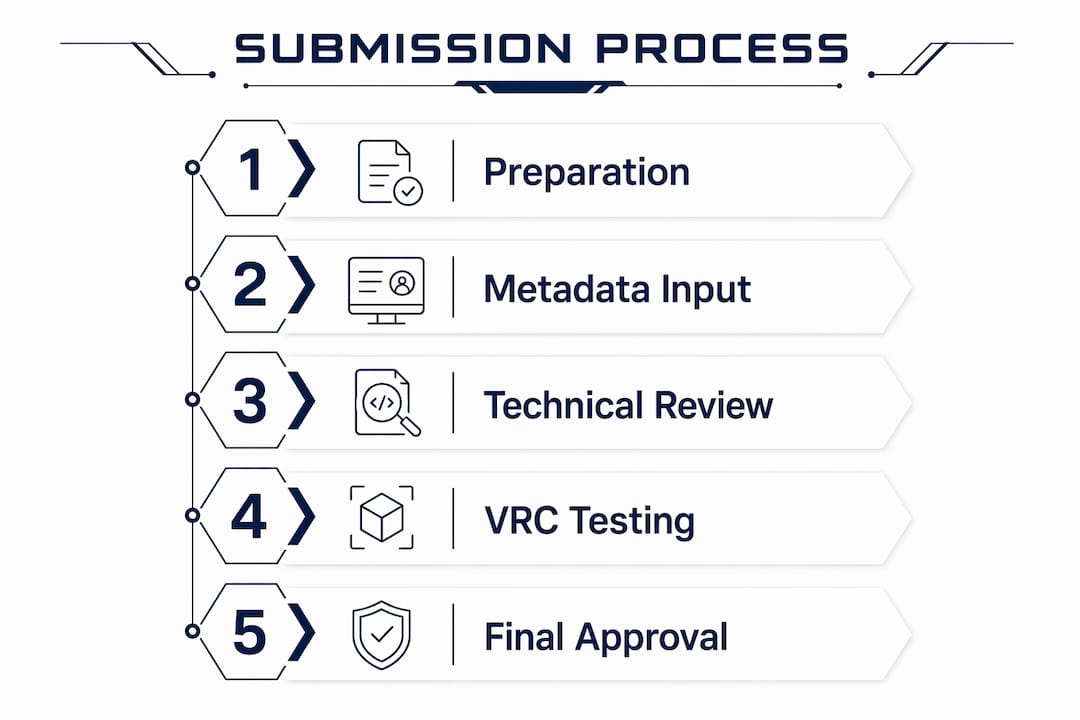
The submission workflow follows a defined sequence:
- Create your app page in the Developer Dashboard. Set your app name, category, and initial metadata. This page is required before any build can be uploaded.
- Upload your build via Developer Hub, CLI, or your game engine editor. Assign the build to a release channel immediately on upload.
- Stage builds through Alpha and Beta channels for external testing. Release channels before Production expose real-world issues before formal review begins.
- Prepare and submit all metadata. This includes store description, cover art, screenshots, trailer, content rating, privacy policy URL, and pricing model.
- Move the build to the Release Candidate channel. This is the final pre-Production stage for internal sign-off.
- Submit to the Production channel for formal review. This action triggers Meta's review queue.
- Monitor feedback and manage corrections. Metadata review takes 1–2 business days. Full technical review may take longer if iterations are required.
The metadata layer is reviewed separately from the technical layer. This distinction matters because a metadata rejection does not necessarily indicate a technical problem, and vice versa. Keeping both tracks clean in parallel reduces total review time.
| Submission Stage | Primary Action | Common Failure Point |
|---|---|---|
| App Page Creation | Set name, category, metadata | Incomplete or mismatched store description |
| Build Upload | APK via Hub, CLI, or engine editor | Unsigned APK or wrong target API level |
| Alpha/Beta Testing | External tester distribution | Entitlement check not triggered in test builds |
| Metadata Submission | Store assets, pricing, privacy policy | Missing privacy policy URL or incorrect cover art dimensions |
| Production Submission | Formal review trigger | Head-tracking or load state violations |
Pro Tip: Write your release notes before you submit, not after. Reviewers read them. Clear notes explaining new features or changes reduce back-and-forth questions and speed up the review cycle.
What is the VRC review, and how do you prepare for it?
Virtual Reality Check (VRC) is Meta's formal review framework. It divides requirements into two categories: required VRCs, which block approval if failed, and recommended VRCs, which affect your app's quality rating but do not prevent publication. Required VRCs block approval while recommended ones influence how Meta positions your app in store rankings and featured placements.
Focusing only on checklist completion is insufficient. Meta's technical reviewers evaluate design and user experience quality, not just binary pass/fail criteria. An app that technically passes every required VRC but delivers a disorienting or low-quality experience will still receive feedback requiring changes.
The most commonly failed VRC categories include:
- Performance. Test against the current rendering-rate and refresh-rate requirements on supported headsets. Set geometry and draw-call budgets from profiling, rather than treating a generic number as an acceptance rule.
- Initial load state. Head-tracked graphics or a valid loading indicator must appear within 4 seconds. A black screen with no feedback fails this check.
- Asset quality. Cover art must be 1024 x 500 pixels. Screenshots must be 2D captures at 1832 x 1920 per eye or equivalent. Trailers must meet Meta's specified encoding standards.
- Security and privacy. A publicly accessible privacy policy URL is mandatory. Apps targeting users under 13 must comply with COPPA requirements.
- Platform Entitlement. The entitlement API must be called and resolved within 10 seconds of launch, as noted above.
Assigning centralized ownership for pre-submission VRC validation to one team member improves consistency and reduces iteration cycles. Distributing validation across multiple developers produces inconsistent results because each person interprets edge cases differently.
Static VRC test plans can become obsolete as Meta updates its guidelines. The practical implication is that your QA process must treat VRC compliance as a living standard, not a one-time checklist. Review Meta's published guidelines within two weeks of any planned submission to catch recent changes.
What are the common challenges in the app approval process for Meta Quest?
The app approval process for Meta Quest involves two distinct review tracks running in sequence. Metadata review resolves in 1–2 business days. Full technical review timelines vary based on the complexity of feedback and whether code-level changes are required. Planning for at least one full review cycle with code changes is the realistic baseline, not the pessimistic one.
The most frequent rejection causes fall into predictable categories:
- Entitlement check absent or delayed. This is the leading technical rejection cause and is entirely preventable.
- Initial load state violations. Black screens, frozen frames, or non-VR loading screens at launch.
- Metadata mismatches. Store descriptions that do not match the actual app experience, or screenshots that show UI not present in the submitted build.
- Missing or inaccessible privacy policy. The URL must resolve publicly at review time, not just at submission time.
- Content policy violations. Age ratings inconsistent with actual content, or content that violates Meta's design policies.
Technical review feedback can require deep code changes, not just asset swaps. Developers who treat the first submission as exploratory rather than production-ready consistently face longer iteration cycles.
On-device performance validation is non-negotiable before submission. Testing in the Unity Editor or on a PC does not replicate Quest hardware constraints. Frame rate drops that are invisible on desktop become disqualifying on Quest 3 hardware under thermal load. Run your final performance validation on the target device, with the release build, under conditions that simulate real user sessions.
Communicating clearly with Meta's review team when responding to feedback accelerates resolution. Vague responses to rejection notes extend the cycle. Reference the specific VRC number, describe the exact change made, and specify the build version that contains the fix.
Before You Commit to a Quest Build: A Practical Checklist
Use this before scoping a native Quest project:
Technical readiness
- Confirm the build meets the current performance VRC on every supported target headset
- Verify draw call and triangle budgets for your most complex scenes on device
- Plan for Platform Entitlement check within 10 seconds of launch
- Identify all network-dependent features and build connection state handling
Account and compliance setup (start week one)
- Create and verify Meta for Developers account and organizational entity
- Configure payment and tax information
- Determine age targeting and assess COPPA compliance requirements
- Draft privacy policy covering all data collection, retention, and sharing practices
Asset pipeline
- Schedule asset production as a separate sprint, not a post-development task
- Cover art: no text, taglines, or banners
- Screenshots: representative of actual functionality
- Trailer: under 2 minutes, focused on learning value not graphical impressiveness
- Text in all assets: minimum 24-point font
Submission timeline
- Reserve review and resubmission time before the planned launch
- Plan for at least one review cycle requiring fixes
- Assign one person to own pre-submission VRC validation — do not distribute this responsibility
Experience design
- Implement pause behavior for headset removal and Universal Menu
- Audit locomotion systems for motion comfort — use world-grabbing where spatial exploration is required
- Position UI elements between 0.5 and 2 meters from the user's viewpoint
- Verify hand tracking handles low-confidence states and input switching correctly
Publishing on the Meta Quest store is a real distribution channel with real commercial momentum. The process is documented, the requirements are specific, and the path through it is learnable. What trips teams up is not complexity — it is treating submission as a formality rather than a production phase with its own requirements.
If you are evaluating a native Quest build for training, education, or onboarding and want to understand whether the platform fits your use case, talk to our team. We have shipped it. We can tell you quickly whether it is the right call for what you are building.
Need Help Preparing a Quest Release?
Bring your current build, target devices, known issues and desired release date to a scoping discussion. We can assess the development, testing and submission work required. Review our VR app development service or send your project brief. Store approval remains Meta’s decision; submission support cannot guarantee acceptance or a review date.