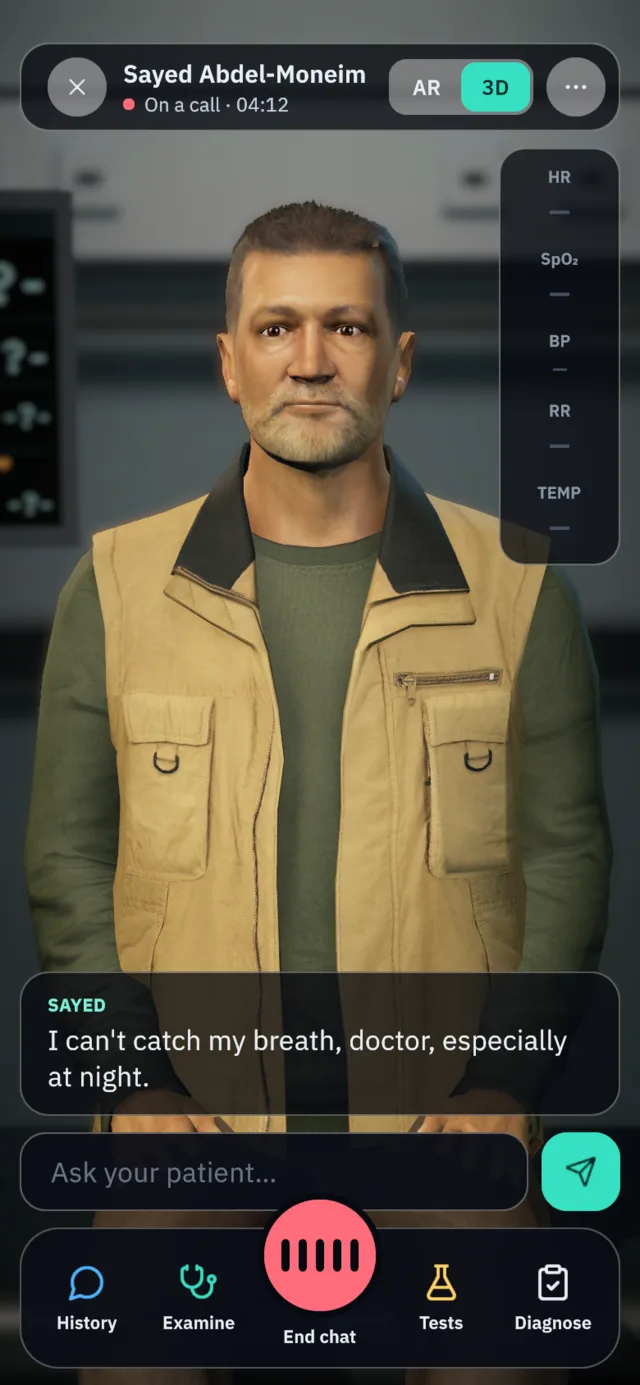
Talking 3D patients for medical students, on Meta Quest, on iPhone and Android, and in any browser. Take the history in English, Egyptian Arabic or Saudi Arabic, examine signs you can see on the body, order the workup, commit to a diagnosis, and get a score sheet that quotes your own words back to you.
The starter library is AI-written and awaiting clinical review. These steps help you evaluate the software; they are not guidance for treating a real patient.
105cases in the library ready to assign
10specialties at 5 levels of seniority
68people dressed for the case
14listening points on the chest and back
50+investigations bloods, ECG, EEG, imaging
7marked domains with evidence for each
3ways to speak English, Egyptian, Saudi
0answer keys on a student’s device
01 / One patient. Every screen.
Wherever yourstudents already are.
One case file, played by every client. The same patient, the same findings and the same marking in a headset, on a phone or in a browser tab, and progress follows the student rather than the device.
A patient in your skills lab.
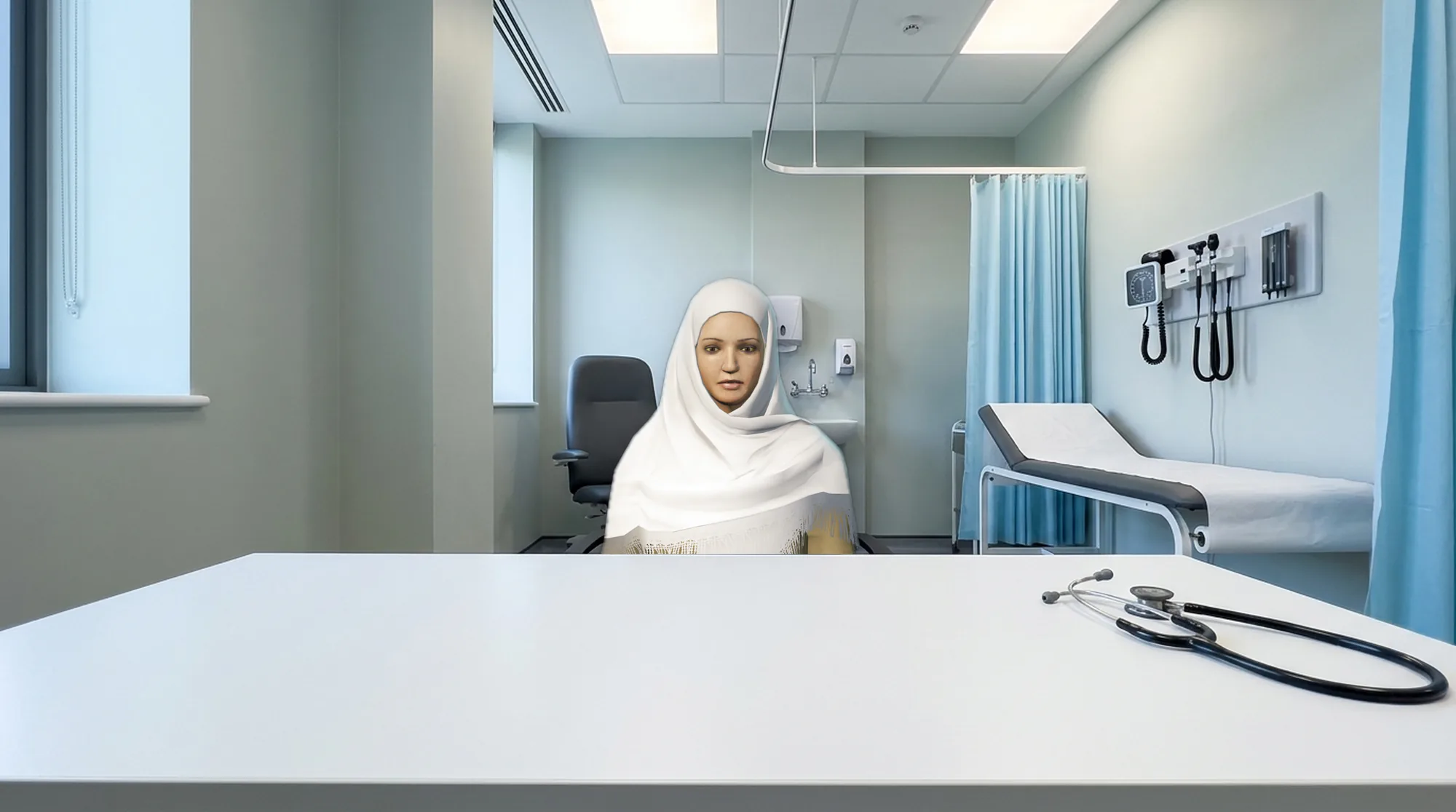
In mixed reality the patient sits in the real room with you. MedSim reads the floor, the walls and the furniture your headset already knows, then places the patient at a comfortable distance, facing you and away from a wall.
A trolley beside the bed holds eight instruments: stethoscope, blood-pressure cuff, pulse oximeter, ECG leads, thermometer, penlight, otoscope and reflex hammer.
Pick a tool up by pinching it, or point at it from the chair and pinch. Put the oximeter on a finger or the leads on the chest and the monitor starts reading that number, and only that number.
Signing in happens at the desk, not in the headset: the Quest shows an eight-character code, the student types it once on the website, and the headset is theirs.
MedSim · Emergency department
Mixed reality · the patient in a real room
Examine
EyesPalmsArms outAbdomen
96HR97SpO₂
حوالي تلات أسابيع، وكل يوم تكبر.
02 / The consultation
A whole consultation,start to finish.
Everything a student does with a real patient, in the order they would do it, with feedback on every step. The screens below are the shipped product.
01History
Ask anything. They answer in character.
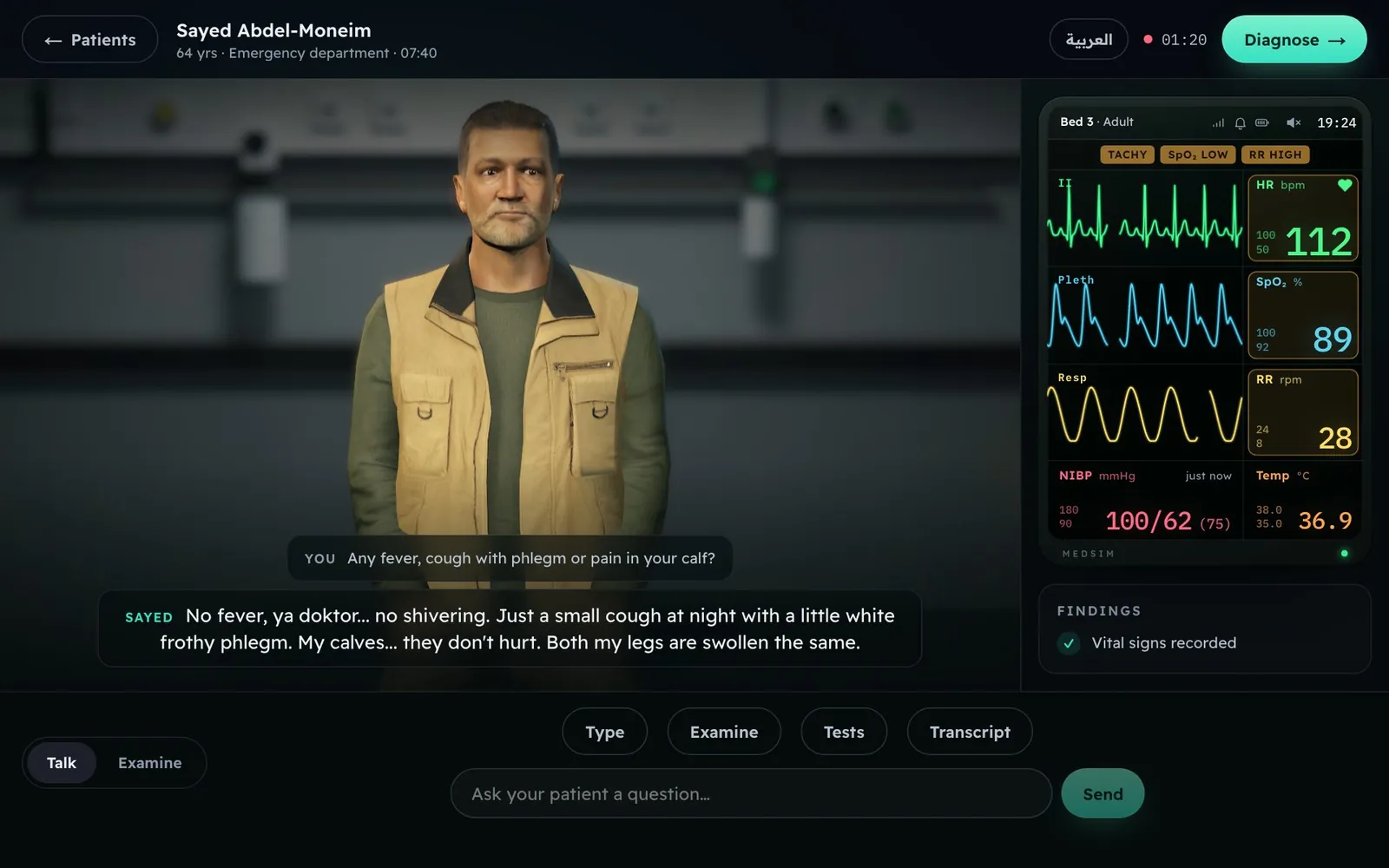
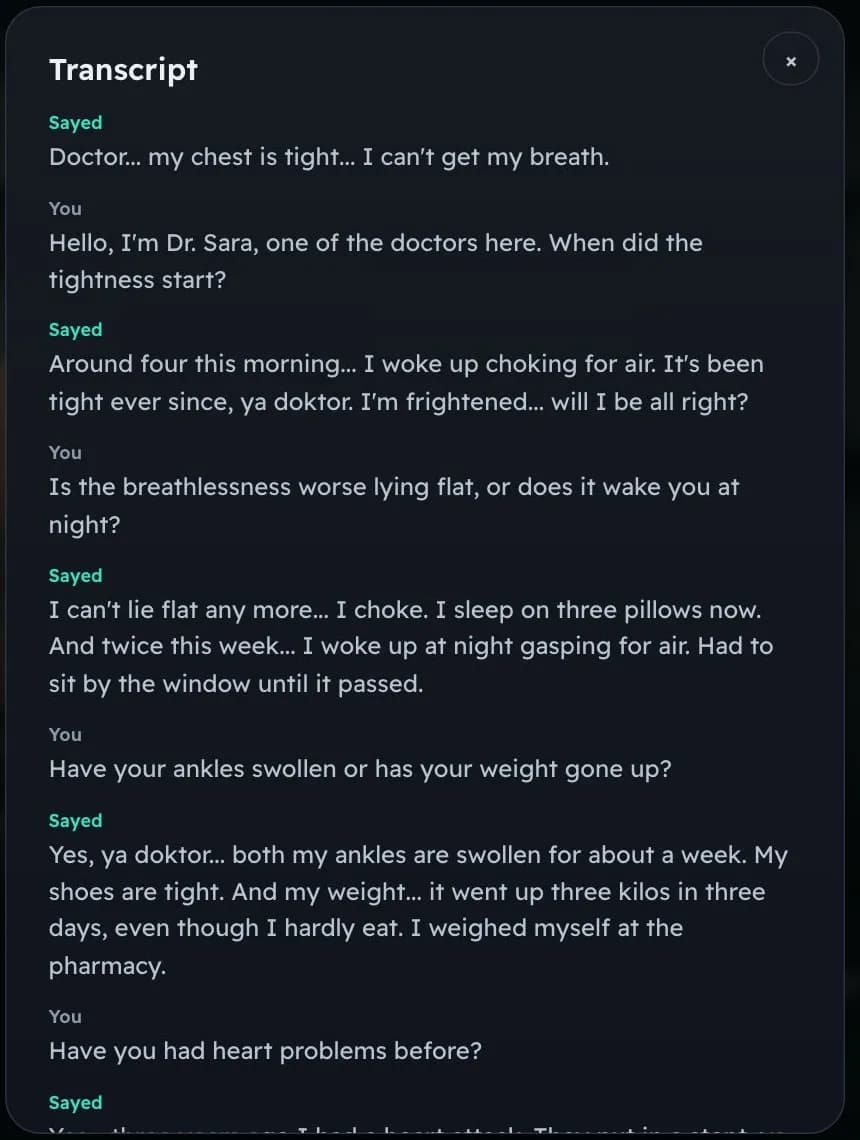
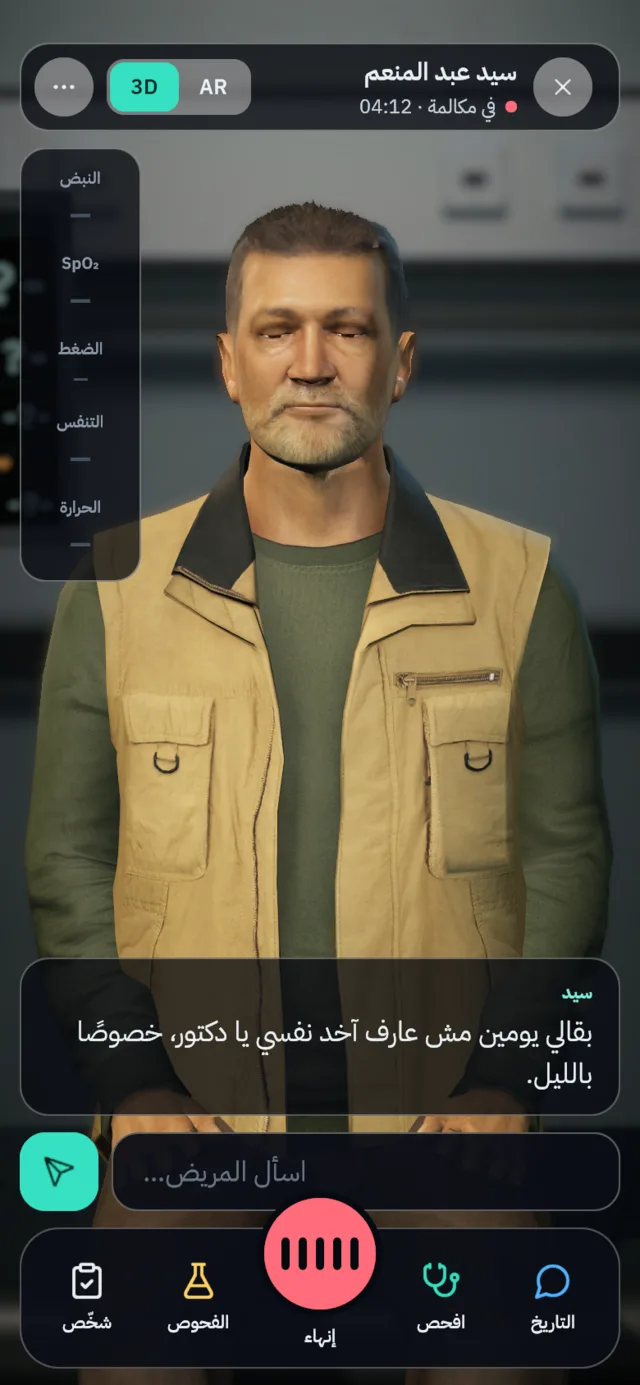
Speak or type. The patient has a life behind the complaint: where they live, what they do, what frightens them and how they talk about their own body. They volunteer some things, hold others back until you ask, and say "the sugar" and "the pressure" the way a real patient does.
MedSim
A consultation in the browser. The patient answers out loud; the monitor runs from the case’s own vital signs.
02Examination
Look, feel and listen where you choose.
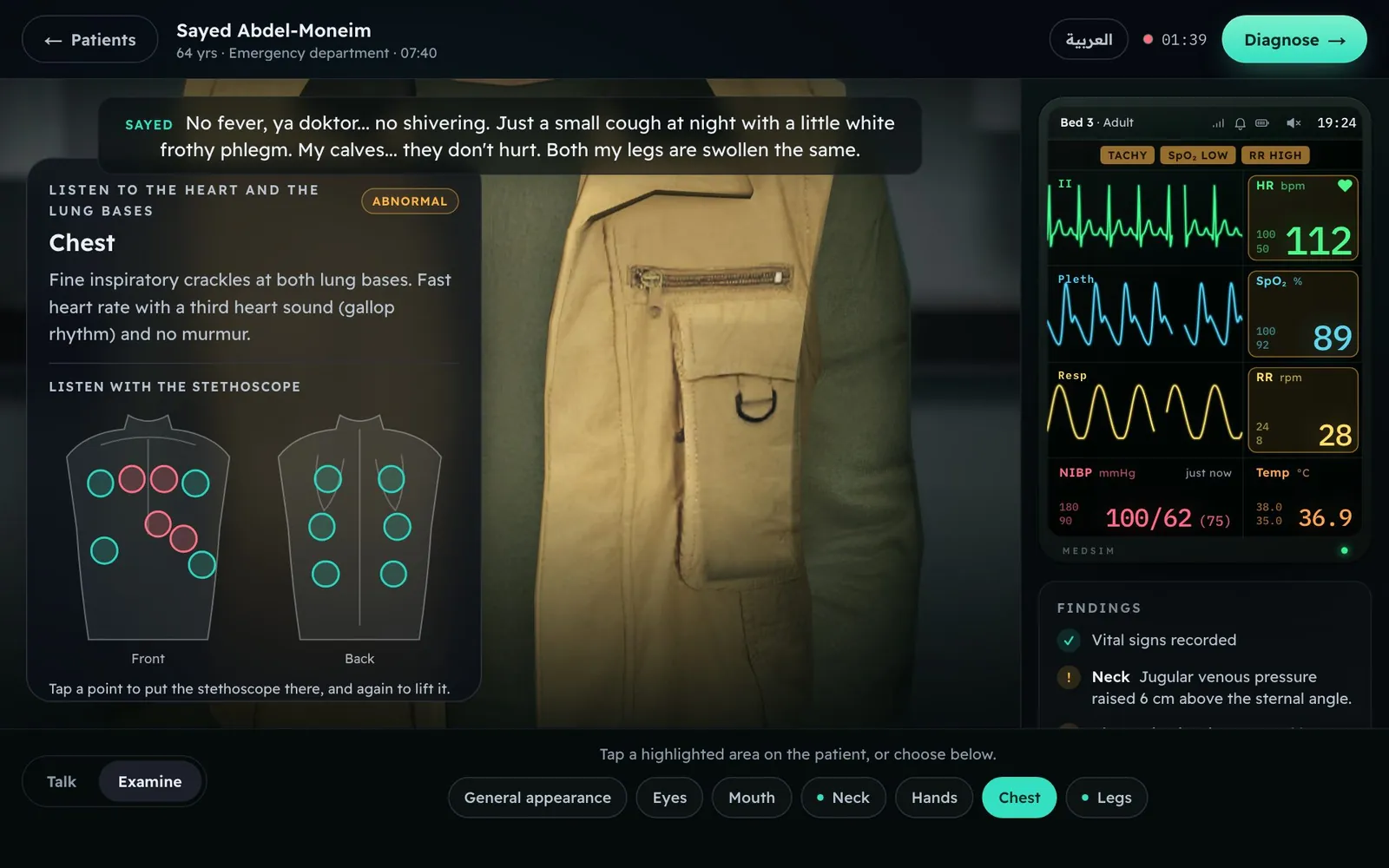
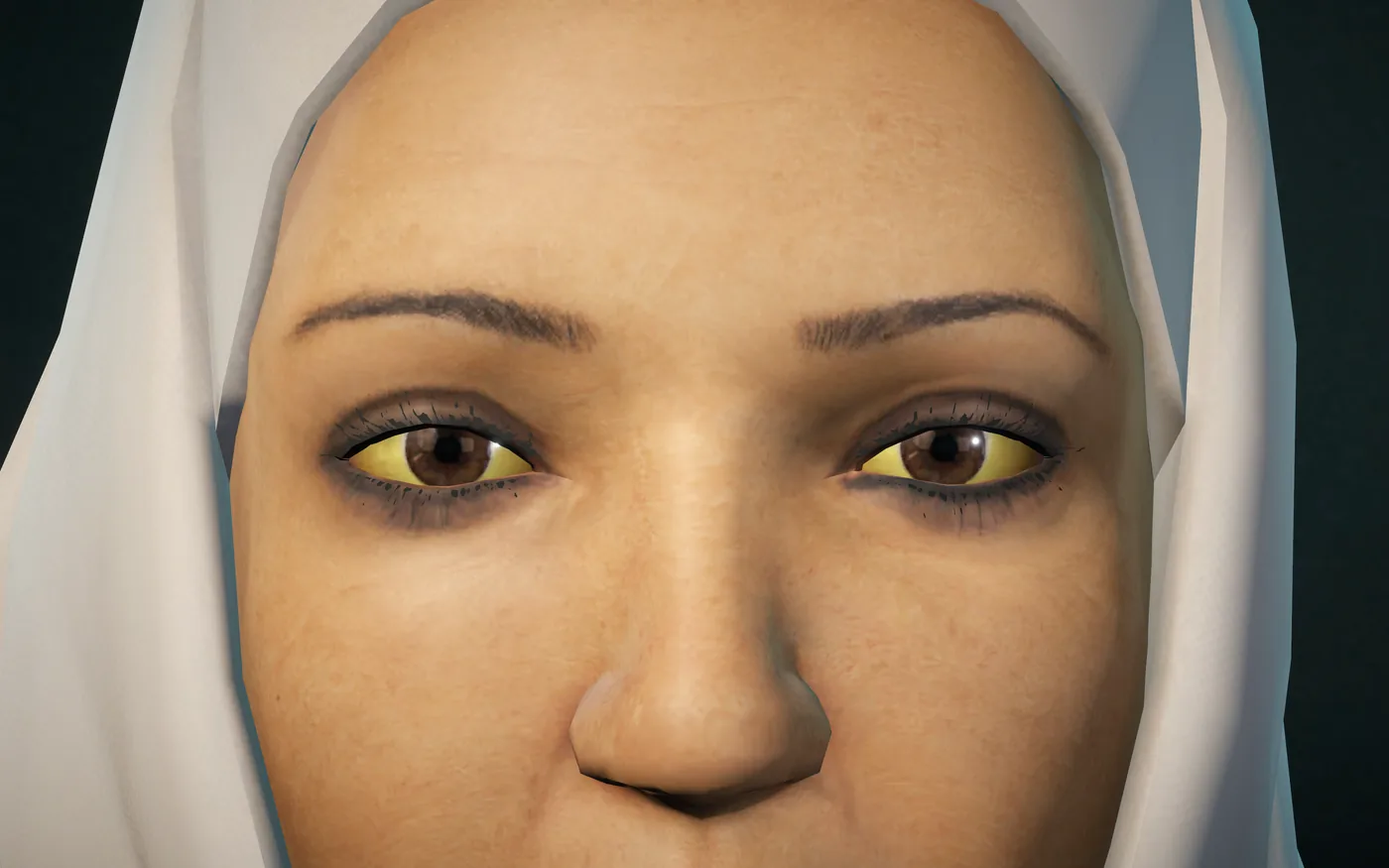
Ten regions, from a general look to the legs. Findings appear because you examined for them, not in a list up front, and visible signs are drawn on the patient at the severity the case sets. Put the stethoscope on any of fourteen points on the chest and back.
MedSim
The chest, with the finding and the fourteen listening points. Red marks the points that sound abnormal.
03Investigations
Order the workup. Pay for what you did not need.
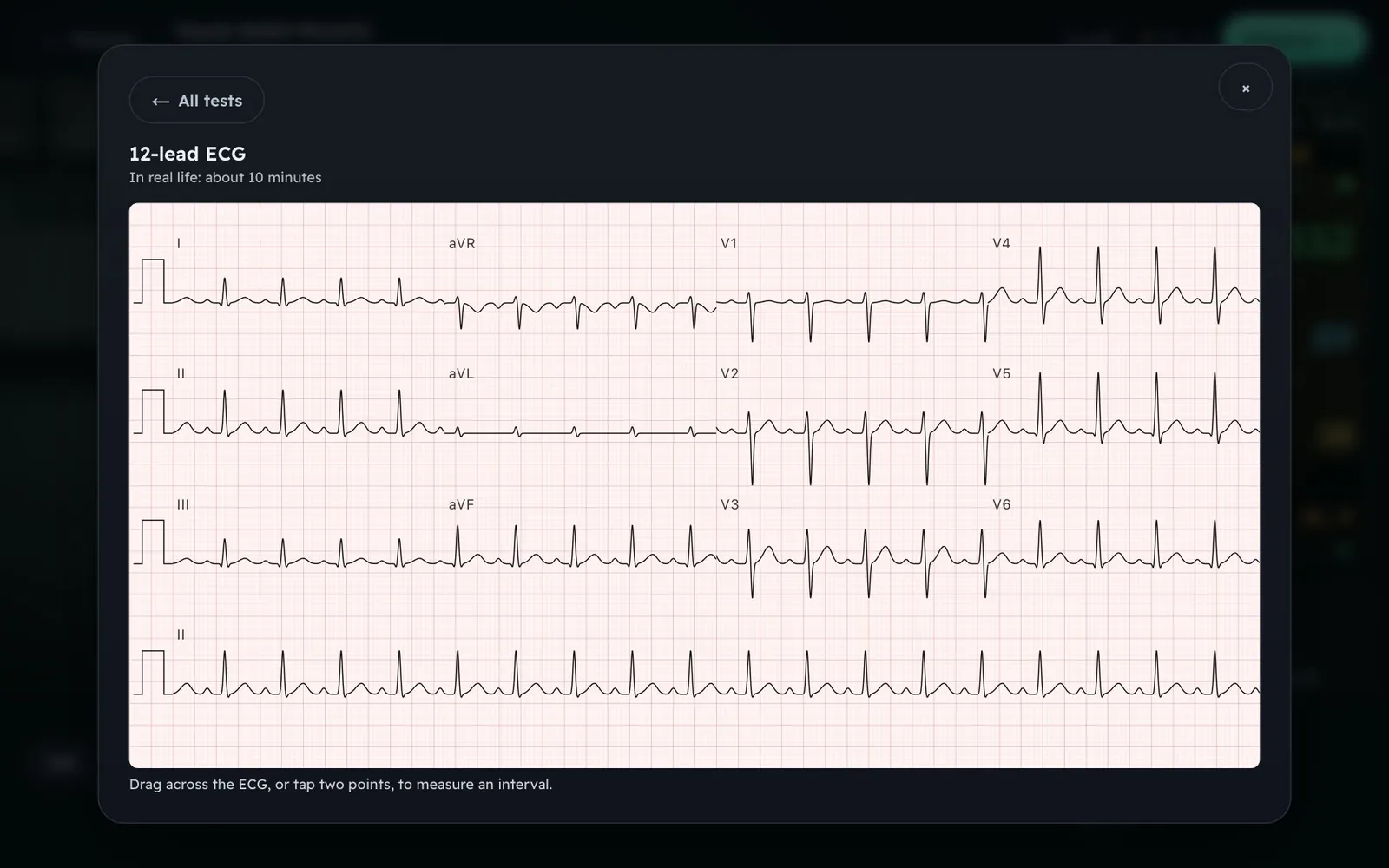
A catalogue of more than fifty tests: bloods with reference ranges by age and sex, cultures and serology, a twelve-lead ECG you can measure with calipers, an EEG on the ten-twenty montage, and imaging with a report. Each result comes back after the turnaround it would really take.
MedSim
A twelve-lead ECG on ECG paper. Drag across it, or tap two points, to measure an interval.
04Diagnosis and plan
Commit, in front of the patient.
In the browser, choose a diagnosis and up to two differentials from the case’s options, then say or type a management plan. The plan records what the student would do next in the simulation.
MedSim
Every word of the consultation is kept, in order, for the student and for the educator.
05The debrief
See the mark, and the reason for it.
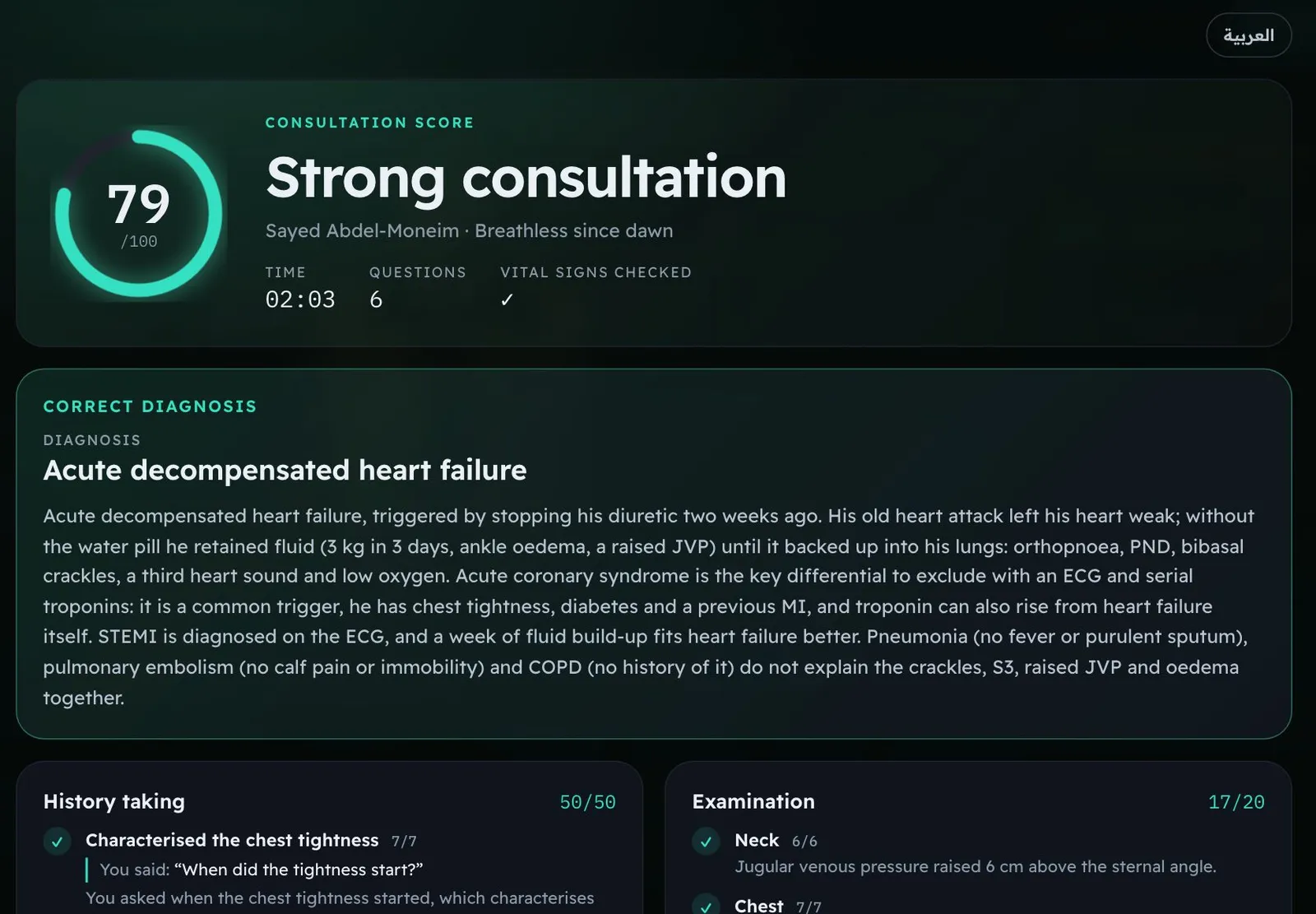
For signed-in learners, the score sheet shows what was asked, examined and ordered, with points and reasons for each line. School assignments follow the educator’s results-release setting. The anonymous browser trial does not reveal a score or debrief.
MedSim
The student’s debrief. The explanation of the diagnosis is part of the case, written by whoever wrote it.
MedSim
A consultation in the browser. The patient answers out loud; the monitor runs from the case’s own vital signs.
03 / Try it here
Signs you canactually see.
These are the patients themselves, rendered in MedSim. Pick a view and examine.
HEPATOLOGY CLINIC · LIVE RENDER
Examination
WAITING
Choose a region on the patient or a view in the list.
04 / The case library
105 cases, writtenbefore you arrive.
Ten specialties, five levels of seniority, at least two cases at each level in each specialty. Almost every one, 103 of the 105, exists twice over: once with an Egyptian patient and once with a Saudi patient, each with their own name, work and way of speaking. Search and filter them, assign them as they are, copy one and change it, or write your own.
1Medical studentThe common presentation, done properly.
2InternThe acute call, with a decision at the end of it.
3ResidentThe case that does not fit the first pattern.
4FellowThe subspecialty problem, and the test that settles it.
5ConsultantThe judgement call, with the evidence weighed out loud.
Cardiology
11 cases · 5 levels
“Chest pain on the stairs”
“Tearing pain on the road”
Respiratory medicine
11 cases · 5 levels
“Two months of cough and sweats”
“Falling asleep at the wheel”
Gastroenterology and hepatology
12 cases · 5 levels
“Blood every time he goes”
“Tired, yellow and her joints ache”
Endocrinology
11 cases · 5 levels
“Vomiting and breathing fast”
“Stones, bones and groans”
Neurology
10 cases · 5 levels
“He woke with half his face drooping”
“The worst headache of her life”
Nephrology
10 cases · 5 levels
“Pain from the side to the groin”
“Collapsed on a summer march”
Infectious diseases
10 cases · 5 levels
“Sweats every night for six weeks”
“Pneumonia in a camel owner”
Haematology and oncology
10 cases · 5 levels
“Dark urine after fresh fava beans”
“A lump in the neck and itching at night”
Emergency medicine
10 cases · 5 levels
“Collapsed in the sun at Hajj”
“Headaches in the bathroom on a winter night”
Paediatrics
10 cases · 5 levels
“Thirsty, thin and wetting the bed again”
“Transfused every month, now breathless”
Said plainly: the library was drafted by AI and every case is published carrying that label, for a clinician to review. That is why your own faculty get the same editor we used. Sixteen specialties are available in it, including obstetrics and gynaecology, surgery, psychiatry, rheumatology, dermatology and geriatrics.
05 / Language
They speak the wayyour patients do.
Not translated Arabic. Egyptian colloquial for an Egyptian patient, Najdi and Hijazi turns of phrase for a Saudi one, each written as its own person rather than a subtitle of the other. Choose a language below and watch the ward change.
The patient speaks Egyptian colloquial Arabic, the way a patient in Cairo actually speaks.
Cardiology
الطوارئ · ٠٧:٤٠
سيد عبد المنعم · 64
سواق أتوبيس على المعاش
«صدري مقبوض من الفجر، ومش قادر آخد نفسي.»
My chest has been tight since dawn, and I can’t catch my breath.
Hepatology
عيادة الكبد · ١٠:٣٠
فاطمة عبد الحميد · 54
ست بيت
«بطني بتنفخ يوم عن يوم، وعينيا بقت صفرا.»
My belly keeps swelling, and my eyes have gone yellow.
Respiratory
عيادة الصدر · ١٢:١٥
رجب عبد العزيز · 58
سواق ميكروباص
«الكحة دي معايا بقالها شهور، ودلوقتي بقى فيه دم في البلغم.»
I’ve had this cough for months, and now there’s blood in my spit.
The Saudi version of a case is a different patient, not a translated one: their own name, their own work, their own clothes and their own words. Switching above switches the person, exactly as the product does.
The interface turns around too.
Arabic is not a language pack bolted on at the end. The whole product reads right to left in Arabic, on the website, in the phone apps and in the headset, and every page was checked at phone width in both languages.
A student can switch language in the middle of a consultation. The transcript keeps whichever language each line was actually said in.
06 / Clinical depth
Deep enough to beworth the hour.
Examination
Signs on the body, not in a text box.
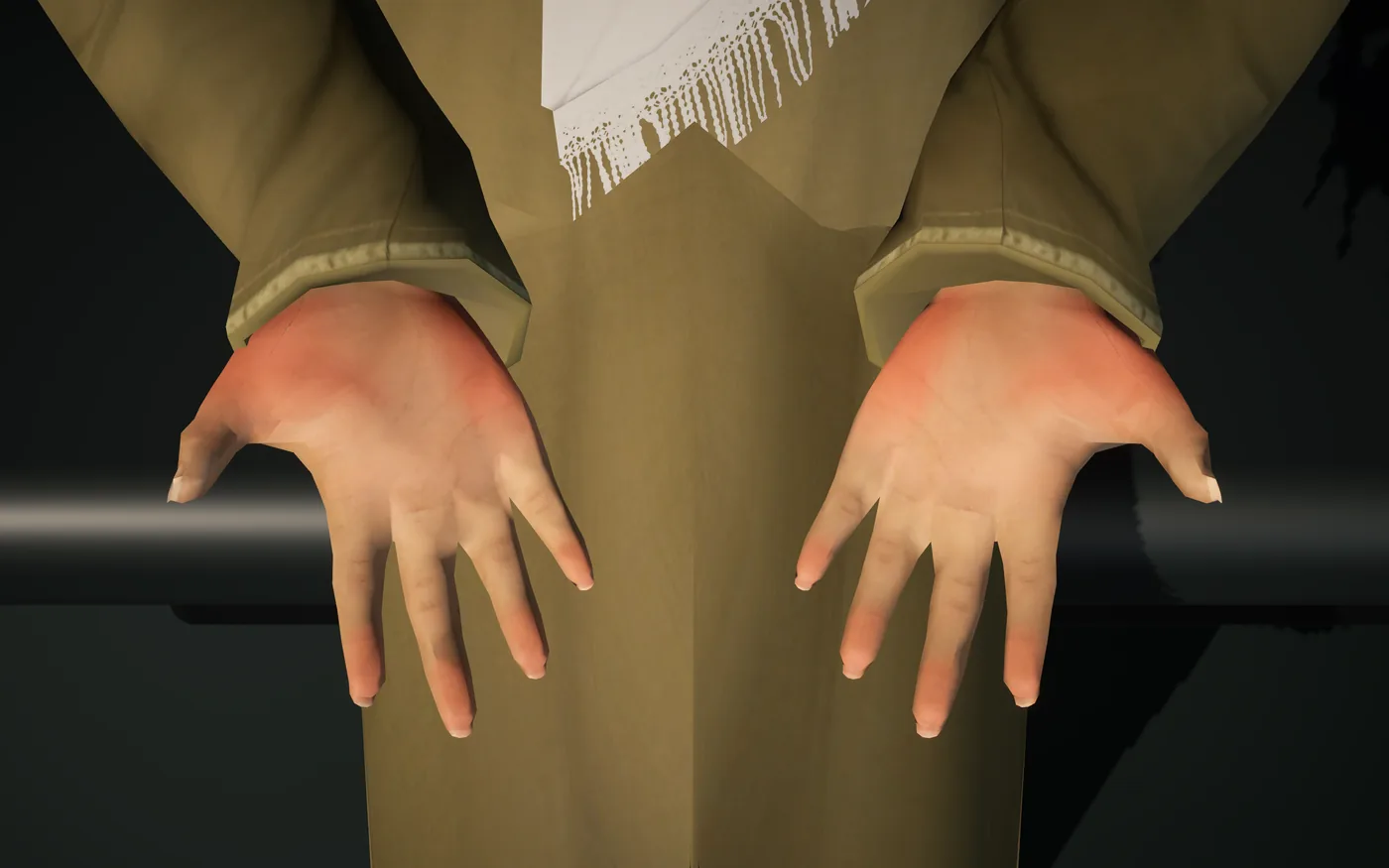
Ten regions: general appearance, eyes, mouth, neck, chest, abdomen, hands, palms, arms held out, legs.
Thirteen visible signs are rendered on the patient at the severity the case sets, among them jaundice, pallor, cyanosis, clubbing, tar staining, palmar erythema, asterixis, wasting, a goitre and a tremor.
Instruments report only what they measure. Until something is attached, the monitor shows dashes.
Listening
Fourteen points, with real recordings.
Four heart areas (aortic, pulmonary, tricuspid, mitral) and ten lung zones: upper and lower on each side at the front, upper, middle and lower on each side at the back.
Lung sounds are real recordings from the King Abdullah University Hospital set, under CC BY 4.0 and credited in the app. Heart sounds are generated from the case’s own rate and murmur.
An author can upload a recording of their own patient for any point instead.
Investigations
A catalogue of more than fifty tests.
Bloods, cultures, serology, stool and urine studies, each with reference ranges by age and sex, flagged high or low against them.
A twelve-lead ECG generated from rate, rhythm, axis, intervals and per-lead ST and T changes, drawn on ECG paper with calipers.
An EEG composed on the ten-twenty montage (background rhythm by region, spikes, spike-and-wave, focal slowing, a seizure that evolves) or the doctor’s own EDF recording with the patient’s details stripped out.
Imaging uploaded as PNG or JPG with identifying details removed, or chosen from a starter library of eighteen openly licensed images.
Results arrive after their real turnaround. Tests the case did not need cost the student points.
MedSim
Fourteen listening points, front and back.
MedSim
The twelve-lead ECG, measurable with calipers.
07 / Marking
Every point hasa reason attached.
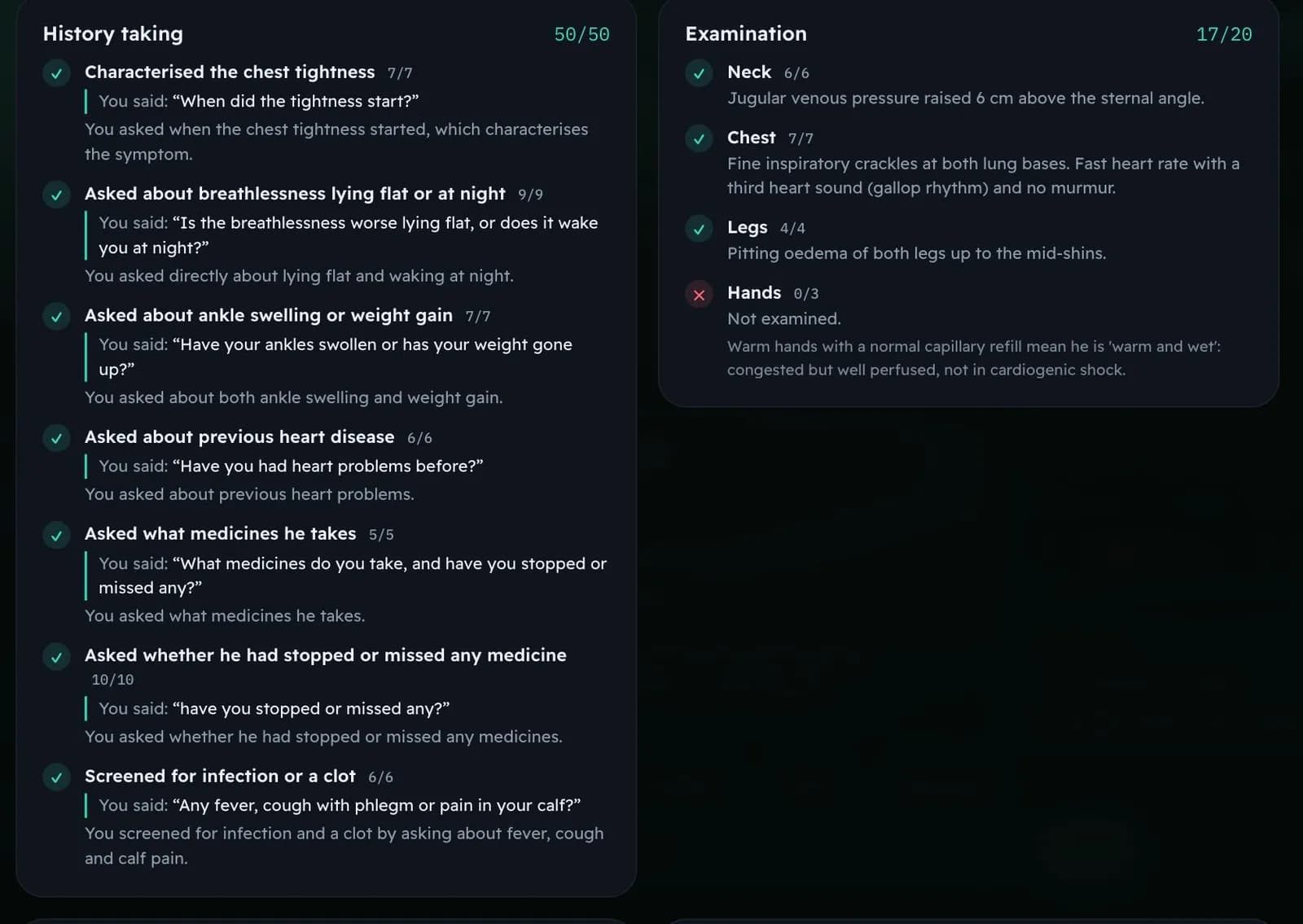
A score with no explanation teaches nothing and defends nothing. MedSim gives the student, and the educator reading over their shoulder, the reason for each line.
HistoryWhat was asked, and what was never asked.
ExaminationWhich regions were examined, and what was found there.
InvestigationsThe necessary tests ordered, the unnecessary ones charged for.
DiagnosisThe diagnosis the student committed to.
DifferentialsUp to two, and whether they were the right ones to fear.
ManagementThe plan, spoken or typed, read against what the case calls for.
What was examined, what was ordered and what was chosen come straight from the log of the consultation. Nothing interprets them.
Conversation is marked by AI, with evidence.
The history and the plan are read against the case’s own criteria by Claude, which must quote the student’s words for every point it gives. Half credit exists for a question half asked.
The author sets the weights.
Each case carries its own score sheet. A communication-heavy case and a diagnostic puzzle do not have to be marked the same way.
An educator overrides any line.
Change a mark and write the reason. The student sees the reason with their result, and the change stays on the record.
Results are released, not leaked.
Marks reach students when the school decides, not the second the AI finishes.
Answer keys never leave the server.
Diagnoses, criteria and rubrics are kept apart from the content a device downloads, so there is nothing on a student’s phone to read or pass on.
MedSim
The score sheet quotes the student back to themselves. “You said: …”, then why it earned the mark.
08 / For educators
Built for the peoplewho teach medicine.
No scripting, no template language, no ticket to us when a case needs changing. A clinician who can describe a patient can publish one.
01
Answer a few questions. Get a whole case.
The AI writes the patient, the story, the findings, the results and the score sheet, in English and Arabic at once, from a short brief you can speak instead of type. Then change any field by hand, or by asking for the change.
02
Seven steps, in the order you think in.
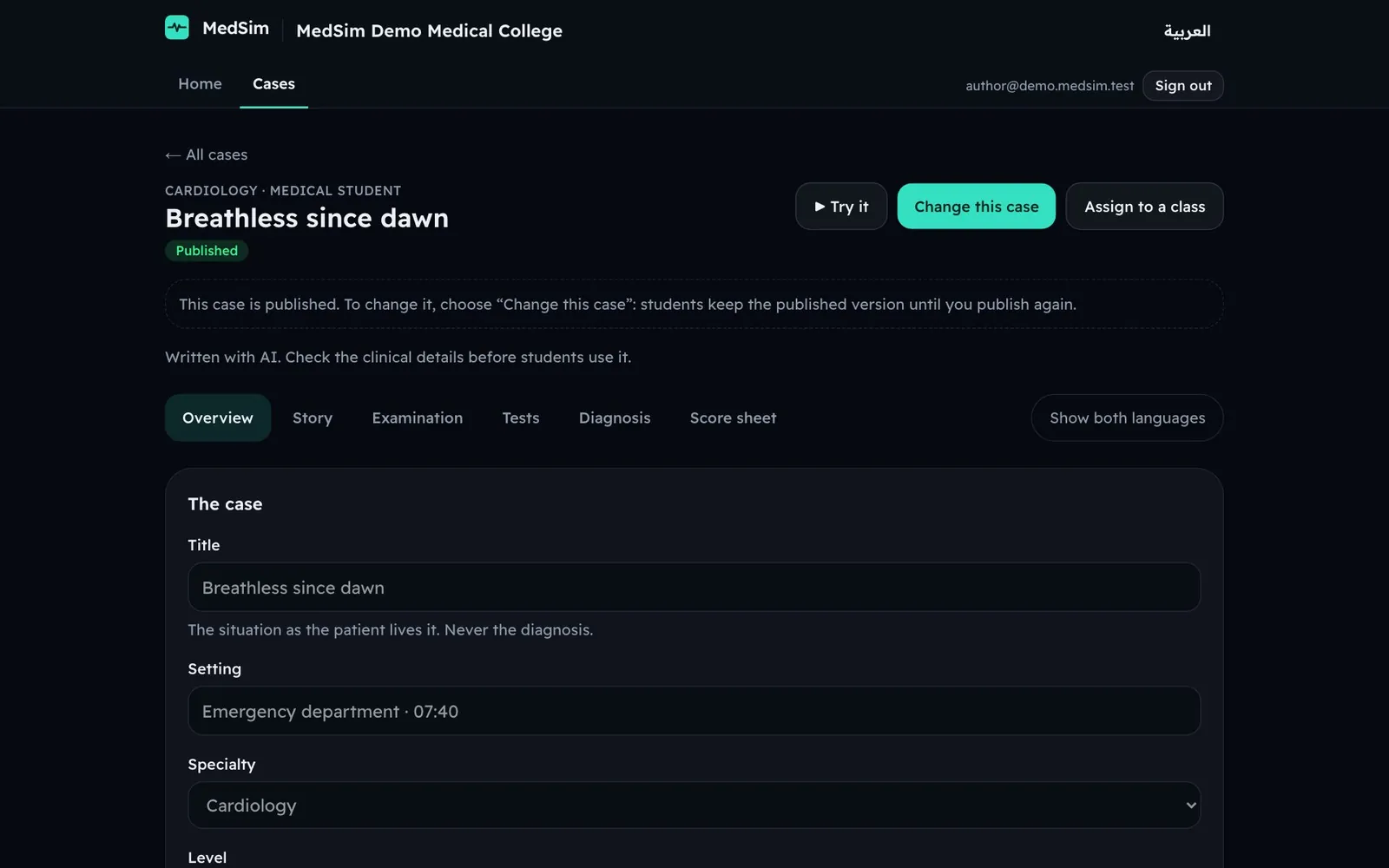
Overview, Story, Examination, Tests, Diagnosis and plan, Score sheet, Try it. A 3D preview of the patient sits beside the editor, so you see who the student will meet.
03
Publish it yourself, and keep the old one working.
A case is published in one click, and students keep playing the published version until you publish again. Every version is kept. Anything AI-written carries the label.
04
Assign it, then watch it happen.
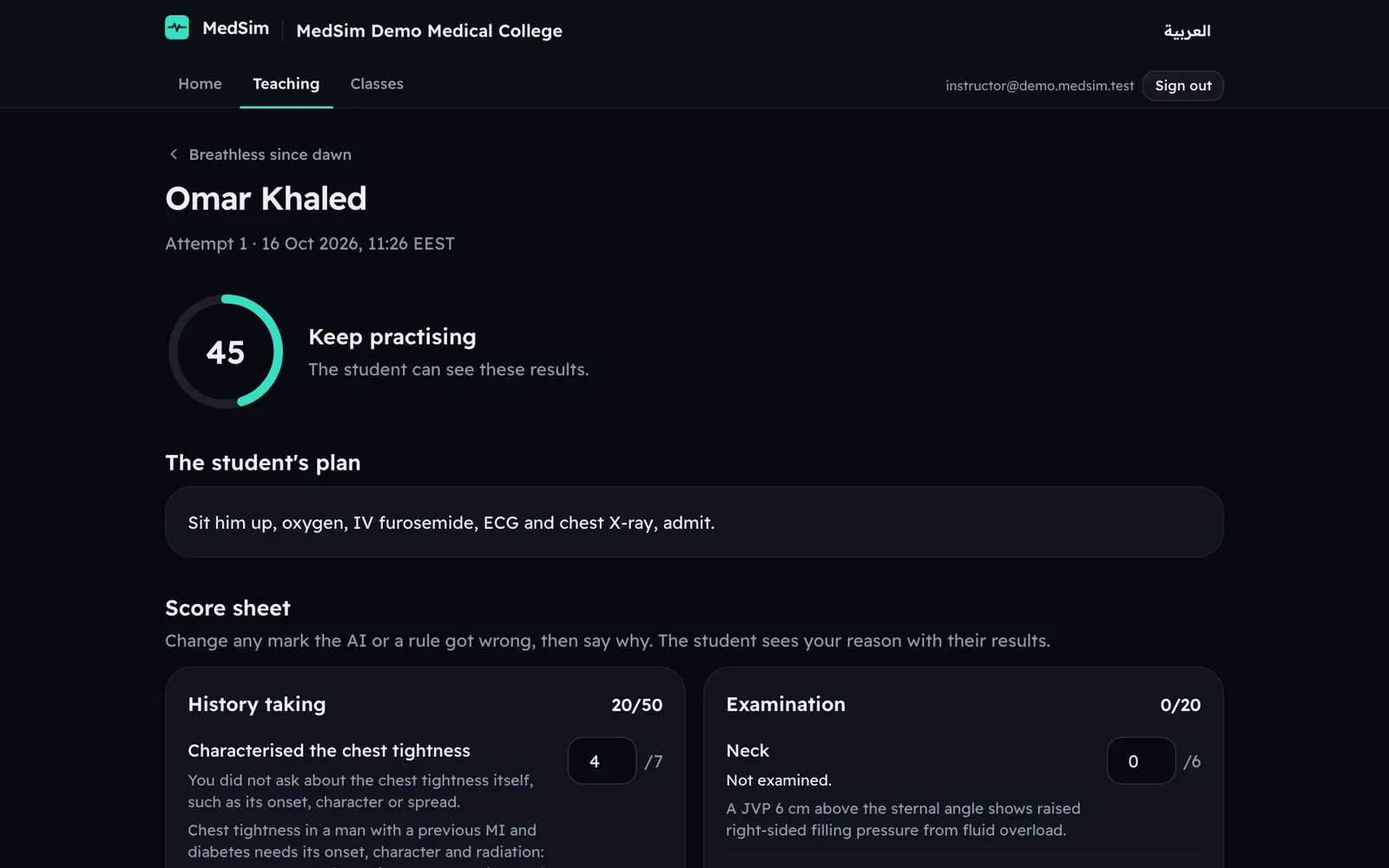
Send a case to a class, follow attempts as they come in, and open any one of them: the score sheet, the full transcript and the student’s own plan.
05
Change any mark, and say why.
Every line is editable. The reason goes to the student with the result. Release the class’s results when you are ready, not before.
06
Take the results away with you.
Export to CSV with every script intact, Arabic included, and put it into whatever your department already uses.
The case studio and an educator reviewing an attempt, shown with a demonstration school’s data.
09 / For schools
From signed tofirst ward round.
01
We set your school up.
Your institution, its administrators and its monthly voice minutes, ready before anyone signs in. You do not configure a tenant.
02
Your admins add educators and classes.
Roles are real: who may write, who may assign, who may change a mark, who may see a cohort.
03
Students join three ways.
A typed list of addresses, a CSV out of your student system, or a join link that only accepts your own email domain.
04
Everyone signs in with a code.
A six-digit code, emailed. No password to reset, nothing to share. On a phone a student can also use Sign in with Apple or Google. A headset shows an eight-character code the student types once on the website.
05
Voice comes by the month.
Each school has an allowance of spoken minutes. When it runs out students keep working by typing, and nothing stops mid-term.
06
Your students never see an ad.
Rewarded ads exist only for individual learners on their own accounts. A school’s students are never shown one.
10 / The people
Sixty-eight people,dressed for the case.
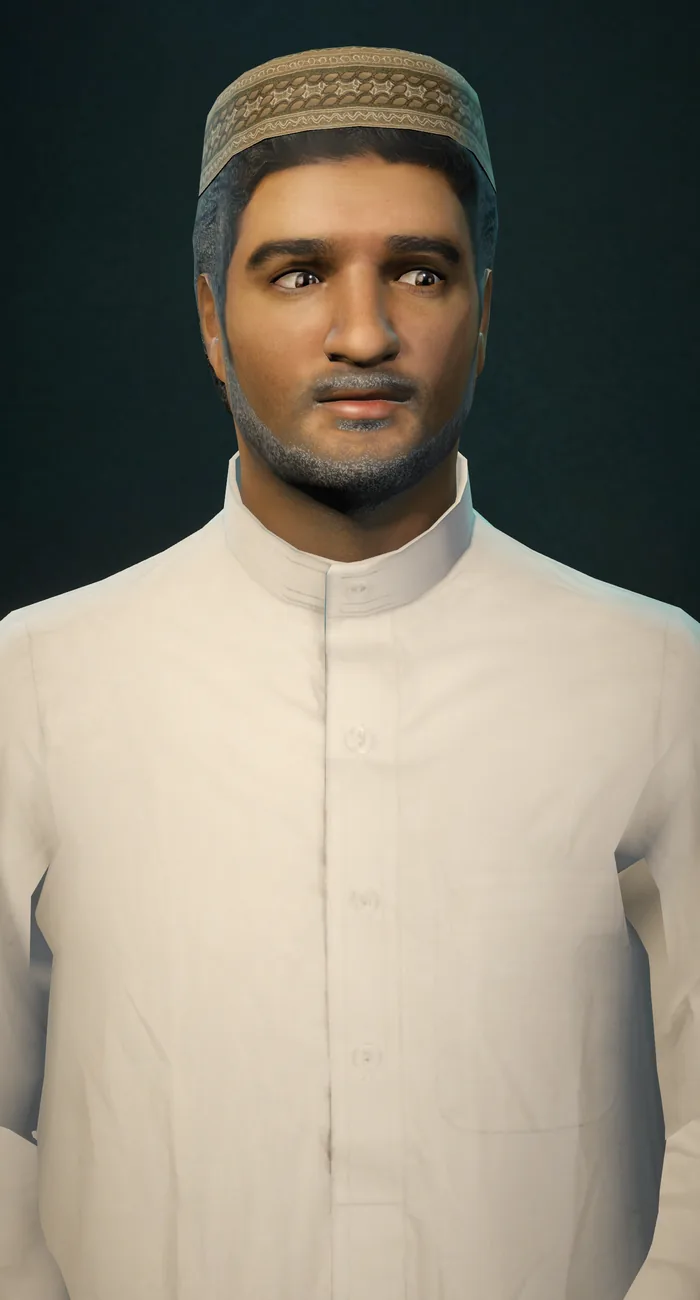
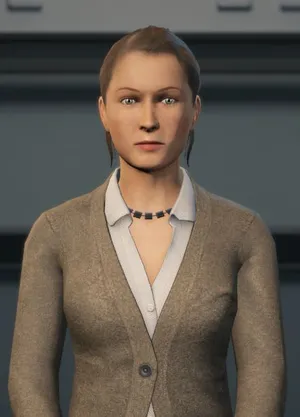
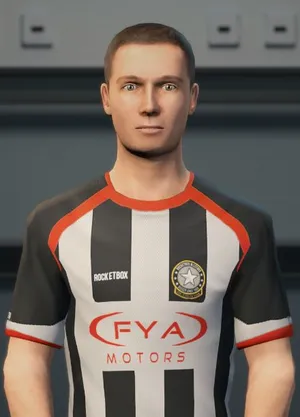
A case picks its patient from a library of sixty-eight, then sets their skin tone, the colour of their clothes and what they wear: a headscarf, a galabeya, a thobe and shemagh. They are loaded only when a case calls for them, which is why the browser player stays small enough for a phone.
The last four are the same people, dressed for a Saudi case. People are Microsoft Rocketbox avatars under the MIT licence, re-rendered in MedSim.
11 / Security, privacy and data
The answers yourprocurement office wants.
Every line below is in the published privacy policy and terms, which are written from what the code actually does. Read them before you talk to us.
Where the data is, and who touches it
Database and sign-in
Supabase, Frankfurt, Germany
Website and app servers
Vercel, Frankfurt, Germany
Patient voice and speech to text
ElevenLabs, United States
Marking and the case writer
Anthropic, United States
Sign-in and notification email
Amazon Web Services, United States
In-app purchases
Apple and Google. They take the payment; MedSim receives only the transaction.
Rewarded ads, individual learners only
Google (AdMob), United States. A school’s students are never shown an ad, so this one never touches your data.
For students and staff, your school is the controller and we process on its behalf. For individual learners and visitors, VirtualVerse Studio is.
Every institution is walled off.
Each school’s data is separated from every other school’s in the database itself, by row-level security, and staff see only what their role allows. The isolation is covered by tests that run on every change.
Your voice is not recorded.
Speech is turned into text as you speak and the audio is discarded. The voice provider deletes its own copy of the transcript after seven days. The transcript MedSim keeps is the one your educators read.
Answer keys stay on the server.
A device downloads the case, never its key. Diagnoses and rubrics are stored apart from published content.
Nothing is sold, nothing trains a model.
MedSim does not sell data and does not use it to train AI models.
Only the cookies it needs.
Those that keep you signed in, one that remembers your time zone, and the browser’s own storage for your language. No advertising or tracking cookies.
Deletion you can hold us to.
A school can have a student’s data deleted at any time, and when an agreement ends the school’s data goes within 90 days. An individual deletes their own account in the app, at once.
Written for the law you work under.
The privacy policy and terms are written around Egypt’s Law No. 151 of 2020 and Saudi Arabia’s Personal Data Protection Law, and name every transfer out of the country.
Built for adults in medicine.
MedSim is for medical students and the staff who teach them, and is not meant for anyone under 18.
Usable in both directions.
Every page of the product was walked at phone width in English and in Arabic, checking for sideways scroll and for accessibility problems. The consultation can be taken by typing throughout, so it does not depend on a student being able to speak or hear.
MedSim is on Google Play for anyone, with no school behind them, and coming soon to the App Store. Students often arrive that way, which is usually how a department hears about us.
Free
No card
Three typed consultations a day
Three minutes of voice on joining
One more typed consultation for each short ad watched, up to five a day
The whole library, a record and a streak
MedSim Plus
$9.99/month or $59.99 a year
Thirty voice minutes a month
Ten typed consultations a day
No ads
Minute packs of 10, 30 and 100 on top, bought in the store
A monthly pool of voice minutes for the whole school, typed consultations unmetered
Your own cases, classes, assignments and gradebook
No ads, ever, for a school’s students
Discuss a pilot and rollout for your institution
Every signed-in learner keeps a record: every consultation with its score sheet and transcript, a streak counted in their own time zone, a best score per case, and a next level that opens once they score 60 on the one below.
13 / Before you decide
What MedSim isnot, yet.
You will find this out in week two anyway. Better it comes from us.
The library is AI-written, and says so.
The 105 library cases were drafted by AI and published with that label, for a clinician to review. Cases your own faculty write and publish carry their name instead. Treat the library as practice material until your department has signed it off.
A score is a teaching tool, not a verdict.
Marks come from rules and from an AI reading the consultation, and they can be wrong. An educator can change any line with a reason, and your school decides what a score counts for.
It is a simulation, never clinical guidance.
Nothing in MedSim is medical advice. It is not to be used to diagnose or treat a real person, and students are told so in the app.
Spoken minutes cost money.
Voice is metered because every minute has a real cost. Typed consultations are not metered, and a case loses nothing by being typed.
Two things are still only on the website.
The EEG trace is read in a browser; the phones and the headset show its report instead. DICOM upload is specified but not built: it waits for the first school that needs it, and imaging today goes in as PNG or JPG. Both are on MedSim’s public roadmap ↗ (opens in a new tab).
14 / Questions
Before yourfirst patient.
Which devices does MedSim run on?+
Meta Quest 3 and 3S, iPhone and Android phones, and any modern browser on a laptop, a lecture-hall screen or a phone. The case library, the assignments and the results are shared, so a student can start a case in a browser and take the next one in a headset.
Which languages do the patients speak?+
English, Egyptian colloquial Arabic and Saudi Arabic. Almost every library case, 103 of the 105, is written with both an Egyptian and a Saudi patient, each with their own name, work and words, so a case does not simply get translated across a border. The whole interface is English and Arabic, laid out right to left in Arabic.
How is a student actually scored?+
Each case carries its own score sheet across seven domains, with weights the author sets. What the student examined, ordered and chose is scored by rule from the log of the consultation. The history and the management plan are read by AI against the case’s criteria, and it must quote the student’s own words for every point. An educator can change any line with a written reason.
Can our own faculty write cases?+
Yes, and most schools should. A clinician answers a few questions, the AI drafts the whole case in both languages, and they edit any part of it in a seven-step editor with a 3D preview of the patient. They publish it themselves in one click. Sixteen specialties are available in the editor, beyond the ten the library covers.
What happens to student data, and where does it live?+
The database and the servers run in Frankfurt. Voice and marking are processed in the United States by ElevenLabs and Anthropic, and the privacy policy names every processor and what it sees. Each school is isolated at the database level. No voice recording is kept. Nothing is sold and nothing trains a model. A school’s data is deleted within 90 days of its agreement ending.
How do students sign in? Do you support our SSO?+
Sign-in is a six-digit code sent to the student’s address, with no password to manage. On a phone a student can also use Sign in with Apple or Google. A headset shows an eight-character code that the student types once on the website, so nothing is typed blind inside a Quest. MedSim does not integrate with an institutional identity provider today. Signing in with your institution’s Microsoft or Google account is on MedSim’s public roadmap ↗ (opens in a new tab); if you need it, it is worth raising on the call.
Not yet, and the product says so everywhere it matters. The library is labelled AI-written and is waiting on clinical review. Cases your own faculty write are reviewed by whoever you say reviews them, and published under their name.
How do we start?+
Use the browser trial checklist to explore a patient without an account. The trial has usage limits and does not reveal your score or debrief. Book a school demo to inspect scoring, educator review and a pilot with your department’s own cases.
A patient is waiting
Your next patientis ready.
Explore a limited consultation in your browser. Nothing to install, no account. Then review scoring and educator tools with us before planning a school pilot.